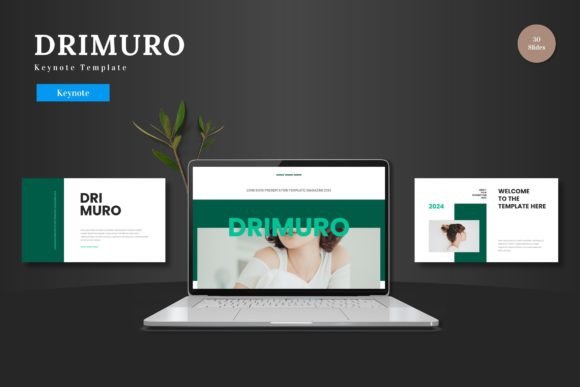
Drimuro: The Keynote Template for Modern Business Presentations
Let's be honest, crafting a presentation from scratch is a time-consuming headache. You open Keynote, stare at the blank slide, and the pressure to create something professional yet visually engaging can be paralyzing. This is where a thoughtfully designed template like Drimuro transitions from a nice-to-have to a genuine productivity tool. It’s not just about having pretty slides; it’s about having a structured, cohesive system that lets you focus on your message rather than wrestling with alignment and color palettes. For the entrepreneur pitching to investors, the marketer launching a new product, or the small business owner outlining a strategy, a reliable template is the foundation of a confident delivery.
More Than Just Slides: A Visual System for Your Brand
Drimuro - Keynote Template presents itself as a clean, scalable, and multipurpose toolkit. What does that mean in practice? "Clean" translates to a modern aesthetic with plenty of white space, ensuring your content remains the star. "Scalable" hints at its robust structure, built on master slides, which means you can easily resize elements without breaking the design. The "multipurpose" claim is backed by its versatility, aiming to serve needs from a sharp business review to a dynamic e-commerce product showcase or a compelling pitch deck.
The real value lies in its organized approach. With over 150 total slides spread across five premade color schemes, it offers substantial variety without overwhelming you. Each of the five color variations provides 30 unique slides, giving you a complete, harmonious palette to start with. This isn't just a random collection of layouts; it’s a curated system designed to maintain visual consistency from your opening agenda to your final call to action. The inclusion of handcrafted infographics and pixel-perfect illustrations means you can present complex data or concepts in a visually digestible way, a crucial element for audience engagement.
Practical Applications Across Your Business Needs
Where could you actually use a template like this? The applications are broader than you might initially think, touching nearly every aspect of professional communication and creative work.
- Brand Building & Marketing: Use it to create a comprehensive brand guidelines presentation for your team or clients. The consistent design language helps reinforce brand recognition. It’s equally effective for developing marketing campaign decks, social media strategy outlines, or quarterly marketing performance reviews.
- Sales & Investor Relations: A pitch deck needs to be persuasive and easy to follow. Drimuro’s structured slides for problem/solution, market analysis, and financials can help build a compelling narrative. For sales teams, it’s ideal for creating polished product demos or service proposals that look professional and credible.
- Product & Project Management: Showcase a new product line with dedicated gallery and portfolio slides. Use the infographic templates to map out project timelines, user journeys, or workflow processes. The drag-and-drop picture placeholder feature makes it simple to integrate product shots or team photos.
- Internal Communication & Training: Elevate your internal meetings. Transform a standard operational update or a training session into a more engaging experience. The section break slides provide natural pauses and help organize information logically for better retention.
- Creative & Editorial Projects: For bloggers, content creators, or publishers, it can be adapted into a media kit to showcase audience demographics and partnership opportunities. Editorial designers might use it to present a book or magazine layout concept, leveraging the clean typography and layout grids.
The key here is that all elements are editable directly within Keynote. You don’t need additional software like Adobe Illustrator. Simply input your content, drag your images into the placeholders, and adjust the colors to match your brand’s palette. This accessibility is a major advantage for small business owners and creators who may not have advanced design software skills.
Choosing and Implementing a Template with Purpose
Selecting a presentation template is a design decision that impacts how your message is received. Here’s how to approach it thoughtfully with a tool like Drimuro:
- Define Your Objective First: Are you trying to persuade, inform, or educate? The tone of your presentation should guide your template choice. Drimuro’s modern, professional style suits data-driven pitches and corporate communications well. Its clean lines help maintain focus on the substance of your talk.
- Customize, Don’t Just Populate: The biggest mistake is using a template as-is. Use the color variation feature as a starting point, then tweak it to your exact brand colors. Replace the placeholder images with your own high-quality photography or branded graphics. This transforms it from a generic template into your unique visual asset.
- Leverage the Infographics: Don’t just use the pre-designed charts as decoration. Ensure the data they represent is accurate and directly supports your key points. A well-integrated infographic can simplify a complex idea far more effectively than a bullet-point list.
- Check Readability and Flow: Walk through your completed presentation as if you were in the audience. Are the font sizes legible from the back of a room? Do the section breaks create a logical rhythm? The template provides the structure, but you must ensure the narrative flow is smooth.
- Understand the Included Assets: Familiarize yourself with what’s in the file folder. The "Readme First" document is critical—it will list the fonts used. You may need to download and install those specific fonts to maintain the design’s integrity. Knowing where the assets are helps streamline your workflow.
Ultimately, a premium template like Drimuro - Keynote Template is a design asset that saves time and elevates quality. It provides a professional framework that ensures visual consistency, which in turn strengthens brand recognition and credibility. By investing a little time in thoughtful customization, you transform a set of slides into a powerful communication tool that helps you present your ideas—and your brand—with clarity and polish. The goal is to move beyond just sharing information and start creating a memorable visual experience for your audience.