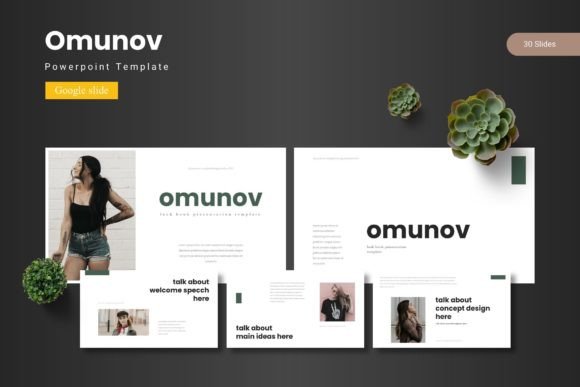
Streamline Your Presentations with Omunov - Google Slide Template
Crafting a presentation that holds attention while maintaining a polished, professional look is a constant challenge for entrepreneurs and creators. You need slides that load quickly, adapt to your brand colors, and organize information without overwhelming your audience. The Omunov - Google Slide Template addresses these needs by offering a robust framework built on modern design principles. With over 150 total slides distributed across five premade color schemes, this package provides the flexibility to tackle various projects, from internal business reviews to client-facing pitches. It moves beyond basic layouts by incorporating handcrafted infographics and pixel-perfect illustrations, ensuring your data tells a compelling story.
A Visual System for Branding and Marketing Assets
Consistency is the cornerstone of effective branding, and the Omunov - Google Slide Template excels in creating a unified visual language. The five distinct color variations allow you to instantly match the template to your existing brand identity, whether you are preparing a quarterly report or a social media strategy deck. Each of the 30 slides per template is designed with specific functions in mind, including dedicated gallery and portfolio sections. This structure is particularly valuable for designers and small business owners who need to showcase work samples or product features. The pixel-perfect illustrations and resizable graphics mean you aren't stuck with generic stock imagery; instead, you can tailor every visual element to reinforce your unique brand narrative.
The practical applications extend far beyond the slide deck itself. By establishing your visual hierarchy and color palette within these slides, you create a reference point for other design assets. Imagine using the infographic layouts to inform the design of a new website's data visualization or drawing inspiration from the typography pairings for your next packaging design project. The template acts as a central hub for your visual communication strategy, ensuring that your marketing materials—from email headers to printed brochures—share a cohesive aesthetic.
Practical Workflow Enhancements for Busy Professionals
Time is a critical resource for any creative professional or entrepreneur. The Omunov - Google Slide Template is engineered to streamline your workflow through features like master slides and picture placeholders. Master slides allow you to make global changes to fonts, colors, and logos with a single edit, eliminating the tedious process of updating each page individually. This is a significant advantage when you need to adapt a presentation for different audiences or update your branding across dozens of files.
The drag-and-drop picture placeholder functionality further accelerates the design process. Instead of manually cropping and positioning images, you can simply drop your high-resolution photos into the designated frames. This feature is invaluable for content creators and marketers who frequently update their decks with new campaign visuals or product shots. The inclusion of section break slides also helps in structuring your narrative, providing clear visual cues that guide your audience through complex topics. Whether you are preparing a lecture, a workshop, or a sales pitch, these structural elements ensure your message flows logically.
Strategic Typography and Design Flexibility
While the Omunov - Google Slide Template provides a strong visual foundation, understanding the principles behind its design can help you maximize its potential. The template's layout is built to support modern typography, balancing readability with aesthetic appeal. When customizing the slides, consider how font pairings can enhance your message. A clean sans-serif font might work best for body text to ensure legibility, while a more distinctive display font could be used for headings to capture attention. The template's structure accommodates these choices, allowing you to experiment with different typefaces to find the right tone for your project.
Beyond presentations, the elements within this template can inspire broader design projects. The handcrafted infographics can be adapted for blog post graphics or digital product manuals. The portfolio slides can serve as a layout guide for designing lookbooks or editorial spreads. By thinking of the template as a collection of design components rather than a fixed presentation, you unlock its value as a versatile asset for your creative toolkit. This approach is particularly useful for those who need to produce a variety of marketing materials but want to maintain a consistent professional standard.
Integrating Omunov into Your Creative Projects
For those looking to apply the Omunov - Google Slide Template beyond its primary function, consider its role in developing your overall brand identity. The color schemes and graphic styles can inform the creation of social media templates, ensuring your online presence is visually harmonious. The layout principles can guide the design of your website's landing pages or the structure of your email newsletters. By extracting these design elements, you create a seamless experience for your audience across all touchpoints.
When using the template, take a moment to review the included readme file for font and photo information. This ensures you maintain licensing compliance, especially if you plan to use the final presentation in commercial contexts. The template's adaptability makes it suitable for a wide range of professionals, from educators creating course materials to agencies developing client pitches. Its real-world value lies in its ability to reduce design friction, allowing you to focus on your content and message rather than spending hours on layout and formatting. By leveraging its comprehensive features, you can produce polished, engaging presentations that effectively communicate your ideas and strengthen your professional image.