Goraco Google Slide Template: Build Dynamic, Branded Decks
We've all been there. The pitch meeting is in two hours, the content is solid, but the visual presentation looks like a generic afterthought. You open a blank slide deck, stare at the white canvas, and realize that making something look "professional" requires a design budget or a time machine you don't have. This is where the disconnect often happens for entrepreneurs, marketers, and creators. We have the ideas, but we lack the visual assets to communicate them effectively. That gap between a great concept and a polished delivery is exactly what tools like the Goraco - Google Slide Template are designed to bridge. It’s not just about filling slides with text; it’s about creating a visual narrative that commands attention without requiring a degree in graphic design.
The Power of Visual Consistency in Branding
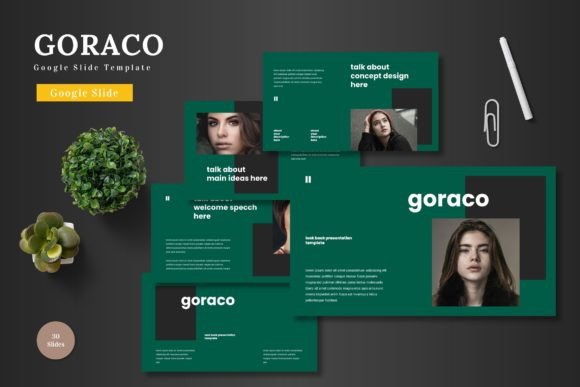
For anyone building a business or a personal brand, visual consistency is the silent partner to success. When a potential client or customer sees your materials—whether it's a pitch deck, a social media carousel, or a webinar presentation—they should immediately recognize your aesthetic. This is where the concept of a design system comes into play, and why a robust template is invaluable. The Goraco template isn't just a single file; it’s a comprehensive toolkit featuring 150+ total slides across 5 premade color schemes.
Imagine you are a small business owner launching a new product line. You need a pitch deck for investors, a visual guide for your team, and a summary for potential partners. If you use a different style for each, your message feels fragmented. With a template that offers 5 color variations, you can select the palette that best represents your brand personality—perhaps a deep navy for corporate trust or a vibrant coral for creative energy—and apply it across all your decks. This ensures that your brand identity remains cohesive. It transforms your presentation from a simple slideshow into a marketing asset that reinforces who you are every time you click "present."
Modular Design: More Than Just Pretty Slides
One of the biggest hurdles in presentation design is the "blank canvas" paralysis. You know what you want to say, but you don't know how to lay it out. This is where the architecture of the Goraco template shines. It is built upon Master Slides, which is a technical way of saying it has a solid foundation. When you change a font or a color on the master slide, it updates throughout the entire deck, saving you hours of manual editing.
But the real magic lies in the modularity. The template includes 30 slides for each of the 5 templates. These aren't just repetitive layouts; they are distinct modules designed for different types of information. You have section break slides to pause and reset the audience's attention, gallery and portfolio slides that are perfect for visual storytelling, and handcrafted infographics.
Let’s say you are a content creator or a marketer preparing a report on Q3 performance. Instead of wrestling with PowerPoint shapes to create a bar graph, you can utilize the pre-designed infographic elements. These are resizable and editable, meaning you can adjust the data points to fit your specific metrics. This modular approach allows you to mix and match elements, creating a custom presentation that feels bespoke, even though it’s built on a framework. It turns the design process into a puzzle-solving activity rather than a struggle against software limitations.
Practical Application: From Pitch Decks to Portfolios
While the term "template" often conjures images of corporate boardrooms, the utility of a high-quality slide deck extends far beyond quarterly reviews. The versatility of the Goraco template makes it a multi-functional asset for various creative and commercial projects.
Consider the realm of digital products and online courses. If you are an educator or a coach, your slide deck is your curriculum. The pixel-perfect illustrations and picture placeholders (drag & drop ready) allow you to create engaging visual aids that keep students focused. Instead of walls of text, you can use the infographic layouts to break down complex concepts into digestible visual chunks.
For web design and social media professionals, the slides themselves can be repurposed. A single slide design can often be exported as an image and used as a high-quality Instagram post or a website banner. The premium graphics included in the pack ensure that your social feed looks curated and professional, boosting your audience engagement. You can create a cohesive look for a LinkedIn carousel that matches your YouTube thumbnails, tying your entire digital presence together. This ability to repurpose assets is a hallmark of smart, efficient design strategy.
Typography and Readability: The Unsung Heroes
A visually stunning presentation fails if the audience can't read it. One of the critical aspects of the Goraco template is its attention to typography. Good typography does more than just display words; it creates a hierarchy of information. It tells the viewer what is most important, what is supporting detail, and what is just a footnote.
When working with a template like this, you have the opportunity to experiment with font pairings. Perhaps you use a bold sans-serif font for your headers to convey modernity and strength, paired with a clean, legible serif or sans-serif for the body text to ensure readability during long presentations. The layout of the Goraco slides is designed with "breathing room" in mind—white space is utilized effectively to prevent cognitive overload.
As a designer or entrepreneur, reviewing the included font styles is a crucial step. You want to ensure that the typeface aligns with your project goals. Is your brand voice authoritative? Playful? Minimalist? The typography should reflect that. Furthermore, always consider the commercial licensing of any fonts you use. While the template provides a visual framework, if you decide to swap in your own premium fonts, ensure you have the rights to use them in commercial settings, especially if the final presentation will be distributed or sold as a digital product.
Maximizing Your Workflow with Editable Assets
Efficiency is the currency of the modern creative. The features listed in the Goraco template—such as resizable graphics and editable elements—are not just bullet points on a sales page; they are workflow enhancers.
Take the picture placeholders, for example. In a standard, poorly designed template, inserting an image often involves cropping, resizing, and fighting with aspect ratios. It’s tedious. A drag-and-drop placeholder, however, allows you to simply select your image, and the template automatically crops it to fit the designated frame perfectly. This saves minutes per slide, which adds up to hours over the course of a major project.
Similarly, the ability to resize graphics without losing quality (vector-based illustrations) means you aren't restricted to the layout's original intent. If you need a specific icon to be larger to emphasize a point, you can scale it up without it becoming pixelated or blurry. This flexibility is what separates a good presentation tool from a great one. It allows you to adapt the template to your content, rather than forcing your content to fit the template.
Final Thoughts on Elevating Your Visual Communication
Ultimately, the goal of any presentation is to persuade, inform, or inspire. The visual medium is the vehicle for that message. Using a comprehensive tool like the Goraco - Google Slide Template is about removing the friction between your ideas and their visual expression. It provides the structure, the aesthetics, and the flexibility needed to produce work that looks like it came from a high-end design agency.
Whether you are a freelancer pitching a new client, a teacher designing a curriculum, or a startup founder seeking funding, the quality of your visuals speaks volumes before you even say a word. By leveraging features like master slides, infographic elements, and color variations, you ensure that your presentation is not just seen, but felt. It’s about taking the raw data and text of your business and weaving it into a cohesive visual story that resonates with your audience and drives your objectives forward.