Designing Trust: A Medical Banner Template for Social Media
In the fast-paced world of healthcare communication, visual clarity isn't just a preference; it's a necessity. Whether you are a clinic administrator, a health-focused content creator, or a freelance designer working with medical clients, the challenge remains the same: how do you convey professionalism and empathy in a split second? The answer often lies in a well-structured layout that respects the content while adhering to strict industry standards. A high-quality Social Media Medical Banner Template serves as the foundational skeleton for this communication, offering a pre-measured, professional canvas that takes the guesswork out of sizing and alignment, allowing you to focus entirely on the message.
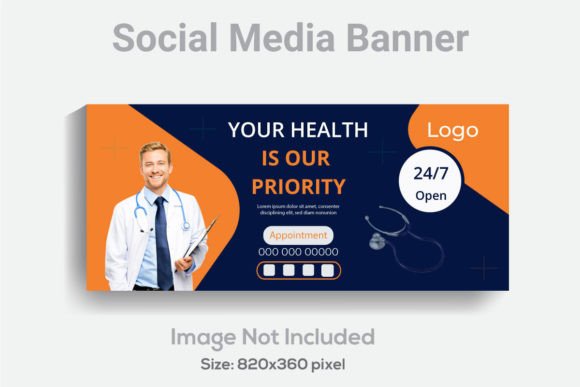
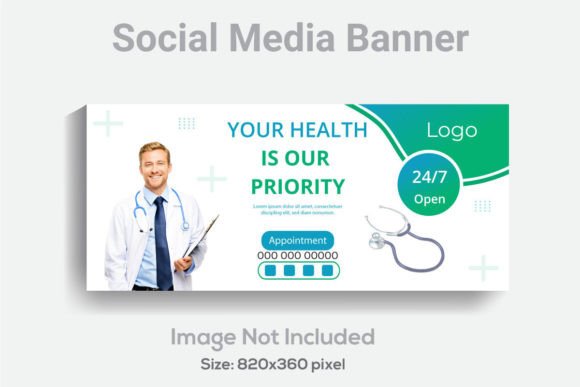
The digital landscape demands precision. With platforms constantly updating their algorithms and display requirements, having a reliable template that is designed specifically for social headers—such as the 820x360 pixel format—is invaluable. This specific dimension is optimized for Facebook page covers and similar headers, ensuring your information isn't cropped awkwardly on mobile devices. When you start with a file that is already set up with RGB Color Design and a high 300 DPI Resolution, you guarantee that your graphics will look sharp on high-definition screens, which is crucial for medical imagery where details matter.
Beyond the Pixels: The Anatomy of a Medical Template
What separates a generic banner from a medical-specific one? It comes down to the "well layered and organized" structure mentioned in the asset description. In the medical field, the hierarchy of information is vital. You need to guide the viewer's eye from the facility name to the service offering, and finally to the call to action (like a phone number or website URL) without confusion. A template built with AI Text (Adobe Illustrator format) allows for this manipulation. You aren't just swapping out a JPEG; you are interacting with individual vectors.
Imagine you are updating a banner for a pediatric dentist's office. You need to adjust the color palette to be softer and more inviting than a high-tech surgical center. Because the font and colors are fully editable, you can soften the blues to pastels and swap out a clinical sans-serif for something friendlier. This level of control is what makes the design feel "custom" rather than "canned." It ensures that the final output aligns perfectly with the specific brand identity of the medical practice, fostering the trust required in healthcare relationships.
Practical Applications in Healthcare Marketing
The utility of a robust Social Media Medical Banner Template extends far beyond just a Facebook header. Its versatility makes it a staple in a designer's toolkit for various marketing assets. Consider the workflow of a small clinic: they might need a consistent look across their patient portals, email newsletters, and physical signage. Because the template comes with 1 Ai File, 1 Eps file, and 1 JPG, it offers cross-platform compatibility.
Here are a few ways this design asset can be deployed effectively:
- Social Media Graphics: Use the primary design for the Facebook header, but crop sections of the AI file to create cohesive Instagram Stories or LinkedIn banners.
- Print Materials: The 300 DPI resolution ensures that if you need to print a small poster for a waiting room or a flyer for a health fair, the text remains crisp and the images do not pixelate.
- Digital Products: If you are creating digital guides or e-books for patients, the header section of the template can be repurposed as a chapter title page, maintaining visual consistency throughout the document.
- Event Branding: For medical conferences or webinars, the layout provides a professional backdrop for speaker profiles or schedule announcements.
Typography and Readability in Clinical Design
One of the most overlooked aspects of medical design is readability. In many industries, you can get away with stylized, hard-to-read script fonts for headers. In healthcare, however, clarity is paramount. The template notes that a free font is used, which is a massive benefit for both designers and clients. It removes the barrier of expensive licensing fees for premium typefaces while still delivering a professional presentation.
When working with the text elements in Adobe Illustrator CS6 or above, pay close attention to font pairing. Medical communications often benefit from a combination of a strong, stable serif font for authority (often used for the facility name) and a clean, readable sans serif font for body text and contact details. This contrast creates a modern typography feel that is easy on the eyes, particularly for older demographics who may be the primary audience for medical services.
Furthermore, the requirement to use Adobe Illustrator CS6 or above ensures that you have access to advanced text editing features. You can utilize paragraph styles, character tracking, and kerning to ensure that your text isn't just readable, but aesthetically balanced. This attention to typographic detail significantly improves audience engagement, as users are more likely to read information that is presented in a visually pleasing, non-cluttered manner.
Streamlining Workflow with Organized Files
For the busy small business owner or content creator, time is money. Wrestling with poorly constructed design files is a drain on resources. The emphasis on a "well layered and organized" file structure cannot be overstated. When you open the AI file, layers should ideally be named logically (e.g., "Background," "Text Header," "Icons," "Images"). This allows you to quickly isolate elements, change colors using global swatches, and swap out placeholder images without accidentally deleting critical design elements.
This organized approach is particularly helpful when creating social media graphics in bulk. If a clinic needs to promote flu shots in October and heart health in February, the template allows for rapid seasonal updates. You can change the color scheme from autumn oranges to heart-health reds in seconds, update the text, and export. This agility is crucial for maintaining an active and relevant online presence, which directly impacts brand recognition and patient engagement.
Ensuring Commercial Viability and Professional Standards
When selecting a design asset for commercial use, licensing is always a key consideration. The inclusion of specific file types (AI, EPS, JPG) suggests a professional-grade product. The EPS file is particularly useful if you are collaborating with other professionals who might use different vector software, ensuring the design assets remain editable and scalable regardless of the platform.
For branding purposes, the 820x360 dimension is a standard that bridges the gap between desktop and mobile viewing. It ensures that the critical information remains visible in the "safe zone" of the image. This technical precision helps maintain a professional presentation across all devices, which is a subtle but powerful way to build credibility.
Ultimately, a Social Media Medical Banner Template is more than just a pre-made graphic; it is a strategic tool. It bridges the gap between high-level medical expertise and accessible patient communication. By leveraging the editable features of the AI file, maintaining strict readability standards, and utilizing the high-resolution output for both digital and print, you create a cohesive visual language that speaks volumes about the quality of care provided. Whether you are designing for a local dentist, a specialized surgeon, or a health coaching service, starting with a structured, professional template ensures your message is delivered with the precision and care the medical field demands.