Design Your Own New Year Social Media Post: A Free PSD Template
That familiar end-of-year scramble is upon us again. You know the one—where you're trying to simultaneously plan holiday promotions, wrap up client work, and figure out how to wish your audience a happy New Year without sounding generic. I've been there, staring at a blank canvas in Photoshop at 11 PM on December 28th, wondering why I didn't prepare this stuff earlier. Sound familiar? If you're a small business owner, content creator, or designer juggling multiple projects, having a reliable, professional template for your New Year social media post can save you hours of stress and help you start the year with a polished, cohesive visual presence.
Why a Square Banner Template Makes Perfect Sense for Your Brand
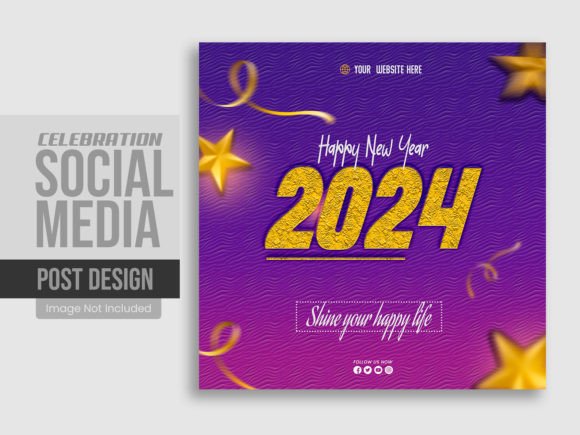
Let's talk about the practical side of social media graphics. A 1080x1080 pixel square format works beautifully across Instagram, Facebook, LinkedIn, and Pinterest. It's the universal size that displays cleanly in feeds without awkward cropping or tiny text that nobody can read. When you're building brand recognition, consistency matters more than most people realize. Your audience starts to associate certain visual elements—colors, layouts, typography choices—with your business. Using a structured template like this New Year social media post design gives you a framework to maintain that consistency while still leaving room for your unique brand personality.
What I appreciate about this particular template is that it arrives as a fully layered PSD file at 300 DPI in RGB color mode. That resolution matters if you ever decide to repurpose your digital design for print materials—think postcards, small posters, or even packaging inserts for product-based businesses. The RGB color mode keeps things looking vibrant on screens, which is exactly where most of us will use these graphics. You're not getting a flattened image where you're stuck with someone else's color choices and text. Every main element sits on its own layer, which means you can swap out backgrounds, adjust typography, change color schemes, and rearrange components to match your existing brand identity without starting from scratch.
Practical Ways to Use This Template Beyond January 1st
Here's something worth considering: a well-designed New Year social media post template isn't just for that single "Happy New Year" message on December 31st. Think about the broader applications for your business or creative projects throughout the entire first quarter.
You could adapt the layout for a "New Year, New Collection" announcement if you sell products. If you're a service-based entrepreneur, maybe it becomes a "Goals for 2024" post that invites your audience to share their own resolutions in the comments. Bloggers and content creators can use the square banner format to promote a year-in-review article or a "What's Coming This Year" preview that drives traffic back to their website. The customizable layers mean you're not locked into a single use case—you're investing in a flexible design asset that grows with your content calendar.
- Brand announcements: Share your business milestones or upcoming plans for the year
- Promotional graphics: Highlight New Year sales, discounts, or special offers
- Community engagement: Create interactive posts asking followers about their goals
- Event invitations: Promote virtual or in-person New Year gatherings
- Email headers: Resize or adapt elements for newsletter campaigns
- Website banners: Add seasonal flair to your homepage or landing pages
- Print materials: Use the high-resolution file for thank-you cards or promotional flyers
For those running multiple brands or managing social media for clients, having a clean, editable template means you can quickly produce customized versions without spending an hour on each one. That efficiency adds up fast when you're handling five or ten different accounts.
Working With the PSD File: What to Expect
If you've used Adobe Photoshop CC 2019 or later, opening this file should feel straightforward. The layered structure means each text element, graphic component, and background layer is separated and clearly organized. You'll find the help guide included with the download useful if you're newer to working with layered templates, though experienced designers will likely dive right in and start customizing.
The free font used in the original design is specified in the file documentation, so you can download and install it to maintain the intended look—or substitute your own brand fonts if you prefer. This is where the template really shines for brand consistency. If you've already established a typeface for your business—whether that's a clean sans serif font for a modern tech brand or a warm script font for a boutique bakery—you can apply those choices directly to the template layers and end up with something that feels entirely your own.
One practical tip: before you start making changes, duplicate the original template file and work from the copy. That way, you always have a clean version to return to if something goes sideways during editing. It's a simple habit that has saved me more times than I'd like to admit.
Making Your New Year Post Stand Out in a Crowded Feed
Let's be honest—your audience will see dozens, maybe hundreds, of "Happy New Year" posts flooding their feeds. Generic designs with clip art fireworks and overused phrases blend into the background noise. What actually catches someone's attention is a design that feels intentional and aligned with a brand they already recognize.
Consider how your color palette communicates your message. Warm golds and deep navy tones feel celebratory and sophisticated. Bright, saturated colors convey energy and excitement. Muted pastels suggest calm and reflection. The template gives you the structural foundation, but your color and typography choices determine whether the final result feels like your brand or just another seasonal graphic.
Typography plays an equally important role here. A display font with personality can set the mood instantly, but make sure your message remains readable at the sizes people actually see in their social feeds. What looks elegant at full zoom on your desktop might turn into an illegible blur on a phone screen. Test your final design by viewing it at actual size on a mobile device before posting. If the key message isn't clear within two seconds, simplify.
Building a Cohesive Visual Strategy for the Year Ahead
Starting the year with a polished, professional social media post sets the tone for your visual communication moving forward. It signals to your audience that you care about presentation, which translates into perceived credibility and trust. For small business owners especially, every touchpoint where a potential customer encounters your brand matters. A cohesive visual identity—consistent fonts, colors, and design language across platforms—builds recognition over time.
This template works as a starting point, but think bigger. If you establish a visual style with your New Year post, carry those design elements into your January content, your email campaigns, your website updates. That consistency is what transforms a single nice-looking graphic into genuine brand recognition. People start to feel your brand before they even read the words.
If you find this template helpful for your creative or commercial projects, consider leaving a rating on the download page. Feedback helps other designers and business owners discover quality resources, and it supports the creators who put time into building these tools. And if you run into any questions while customizing the file or want to discuss specific modifications for your brand, reaching out through the creator's profile is always an option. Sometimes a quick conversation about your project goals can lead to adjustments you hadn't considered.